Appearance
Drafts and version lifecycle
Understand how Dinodial manages agents with Git, how draft branches work, and how to safely test custom tools before publishing to production.
The mental model
An agent in Dinodial is not a static database row. Every agent is a Git repository managed by the engine, where prompts, configuration, audio files, and WebAssembly plugin tools are version-controlled and content-addressed.
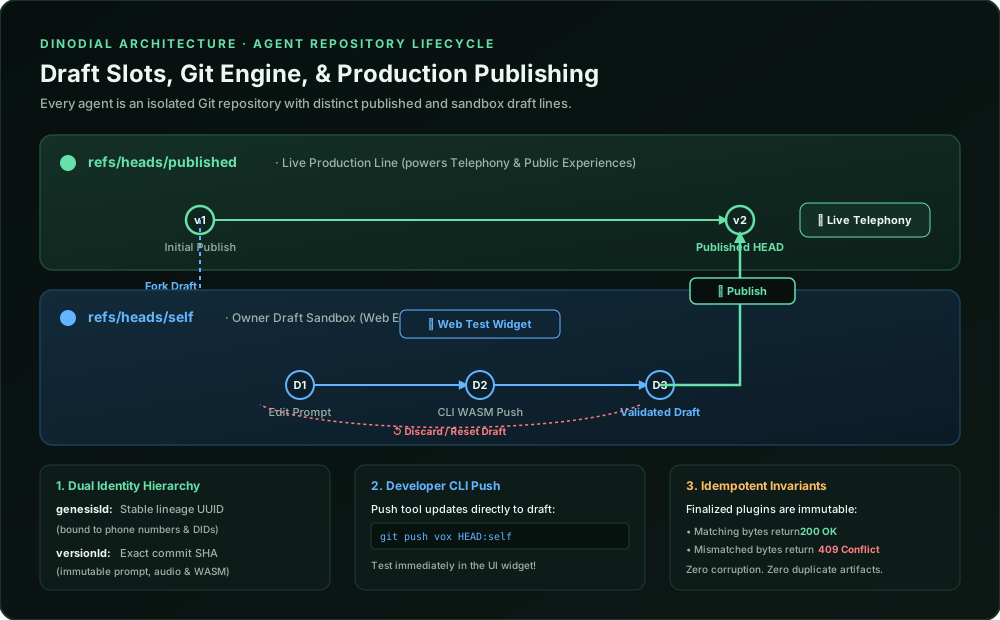
Dual identity hierarchy
| Identity | Meaning | What it binds to |
|---|---|---|
genesisId | Stable Agent Lineage | Permanent identity of the agent. Inbound telephone numbers, campaigns, and experiences point here. |
versionId | Exact Immutable Commit | Specific Git commit SHA. Freezes prompts, flow, master audio, and compiled WASM tools. |
The three branch slots
Every agent repository maintains three dedicated branch slots under refs/heads/:
text
[ refs/heads/published ] ────────► Production Line
         │                         • Powers live phone calls & public Experiences
         │                         • Only updated when you click "Publish" or push to `published`
         ▼
[ refs/heads/self ]      ────────► Your Private Draft Sandbox
         │                         • Forked automatically when you open the Web Editor
         │                         • Powers the interactive Web Test Widget
         │                         • Safe sandbox for instructions, placeholders, and tools
         │
[ refs/heads/am ]        ────────► Account Manager / Collaborator Draft
                                   • Dedicated slot for team collaborators to iterate independently
Lifecycle sequence
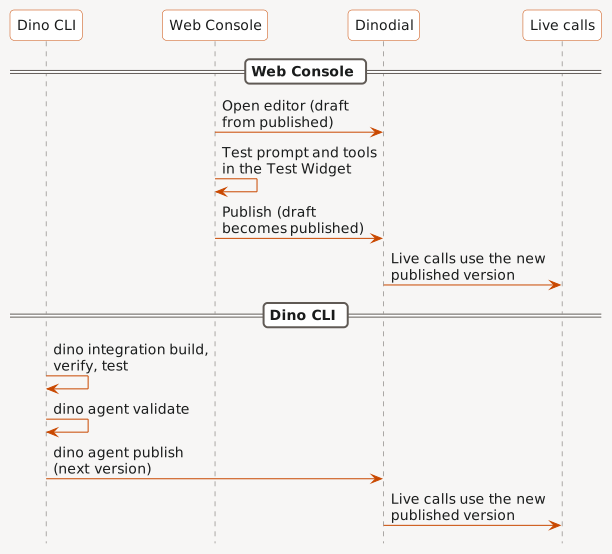
The full path, from opening the editor to switching live calls to the new commit:
Iteration workflows
Workflow 1: Prompt iteration in the Web Console
- Open the editor: Dinodial automatically forks a draft branch (
refs/heads/self) from the latest published commit. - Edit prompts or settings: Changes are saved as commits on your private draft branch.
- Launch the Test Widget: The test widget executes against your draft commit. Incoming calls on your production phone numbers remain unaffected.
- Publish: Click Publish to merge your draft into
refs/heads/published. All production calls immediately run your new version. - Reset / Discard: Click Reset Draft to discard draft changes and sync back to the current published version.
Workflow 2: Updating custom tools via the CLI
Build and test a WebAssembly tool plugin on your machine, then publish the next agent version:
Prompt your AI agent
Recommendedtext
Use the `dino-ping` skill to update this agent's custom tool.
Build, verify, and test the integration, then validate the agent.
Show me the test result and wait for my approval before you publish the next version.
Use the Dino CLI directly
text
dino integration build --agent-dir <agent> --name <integration>
dino integration verify --component <artifact-from-build-result>
dino --confirm-mutation integration.test integration test --policy <policy.toml> --component <artifact-from-build-result> --operation <operation> --args <args.json> --record <record.json> --context <context.json> --config <config.json>
dino agent validate --agent-dir <agent>
dino agent publish --agent-dir <agent>
dino agent publishmakes the next published version. Live calls use it after the publish.- The CLI does not write to the Web Console draft. To test a change in the Test Widget first, make it in the Web Console.
Invariants and rules
- Production isolation: Production phone lines and public web experiences only execute commits on
refs/heads/published. They never see draft branches. - WASM plugin immutability: Once an agent version is finalized, its plugin binaries cannot be overwritten with different code.