Appearance
Simulate a conversation
Connect two of your agents on one Runtime and read a separate Lens report for each side. Use a simulation to prove a full, multi-turn conversation without telephony.
Requirements
A simulation is Pong-tier and billable. It needs:
- A Runtime and partner credentials for the account.
- Gemini (AI Studio) credentials for both agents.
- Two free slots in the account Widget concurrency limit.
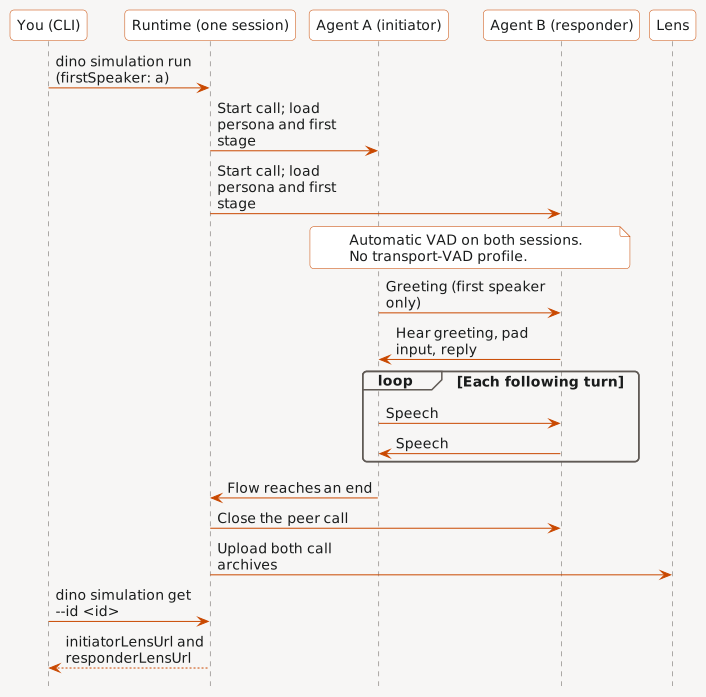
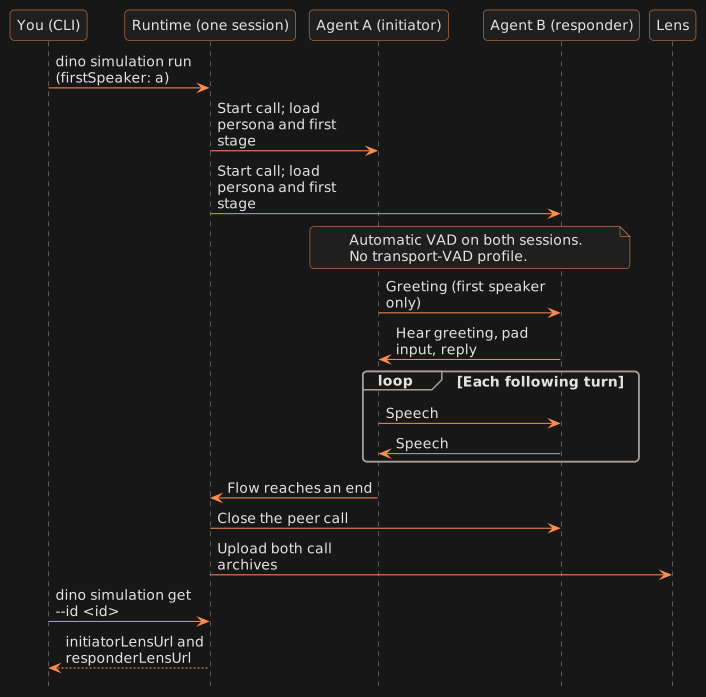
Both agents must be available for the account. Simulations use automatic VAD for both sessions. They have no transport-VAD profile.
Configure the pair
Write a required configuration file. Set firstSpeaker to a (initiator) or b (responder):
json
{"firstSpeaker":"a"}Each side keeps its own persona and first-stage instruction. Only the first speaker plays its greeting. The other side hears the greeting, pads its own input, and replies.
Run and inspect
Prompt your AI agent
Recommendedtext
Use the `dino-pong` skill to run a two-agent simulation.
Initiator agent: <agent>. Responder agent: <agent>.
Verify both agents are available and I have a Runtime, partner credentials, and concurrency.
Write the firstSpeaker config and show every argument and the billing effect.
Wait for my approval, run once, then return both Lens links and outcomes.
Use the Dino CLI directly
text
dino simulation run \
  --simulation-config <absolute-simulation.json> \
  --runtime-id <runtime-id> \
  --hard-close-secs 90 \
  --initiator-agent-id <agent-id> \
  --initiator-partner-id <partner-credential-id> \
  --responder-agent-id <agent-id> \
  --responder-partner-id <partner-credential-id> \
  --confirm-mutation simulation.run

dino simulation get --id <simulation-id>
dino simulation list --limit 25
Supply per-side placeholders and integration context with absolute JSON paths: --initiator-placeholders/--responder-placeholders and --initiator-plugin-contexts/--responder-plugin-contexts. Transcription records both sides by default. Use --transcription-mode in or off to reduce it.
Read the result
simulation get returns status, mode, and an initiator and responder object. Each side has callId, archiveReady, lensUrl, and report.
| Status | Read |
|---|---|
completed | Both archives are ready. Open each Lens link and read each report. |
failed | failure.code and failure.participant (a or b). |
simulation list returns newest first. Each item has the ID, status, mode, both call IDs, and initiatorLensUrl/responderLensUrl. A Lens link is null until that archive is ready.
Gotchas
hard-close-secs(90–900) is the fallback limit. There is no separate simulation duration.- Each Lens link appears only after that side's archive reaches Lens.
- An available Lens link does not clear an earlier failure.
- Do not start a replacement run automatically. Each run is billable.
Next
Use Test your agent for the single-call preview path.